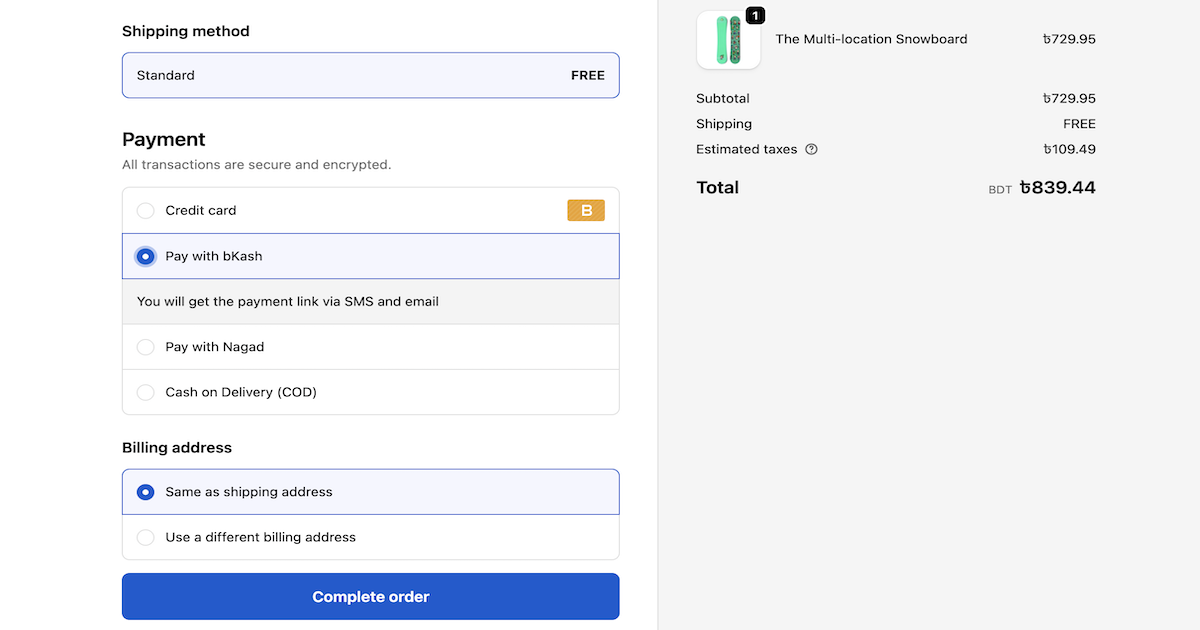
Your customers pay with bKash. Your customers pay with Nagad. But your Shopify store has no idea what either of those are.
That is the problem every Bangladeshi Shopify merchant runs into - and most of them end up with a messy workaround. Taking payment screenshots on WhatsApp. Manually marking orders as paid. Losing customers who could not figure out where to send the money.
BD Wallet solves this in under 10 minutes. Connect your bKash and Nagad credentials, and your store starts sending payment links automatically - no developer, no custom code, no manual work.
This guide walks through every feature, the full setup process, and why this is the simplest Shopify Bangladesh payment solution available right now.
Why Shopify Does Not Support bKash or Nagad Out of the Box
Shopify was built for international markets - Stripe, PayPal, credit cards. It has no native support for mobile wallets like bKash or Nagad.
Bangladeshi merchants are left with two bad options: either lose customers who do not have cards, or manage payments manually outside Shopify.
Neither works at scale. Both cost you money.
BD Wallet plugs directly into Shopify and adds bKash and Nagad as real payment options - automatic, verified, and tied to your Shopify orders.
What BD Wallet Does for Your Shopify Store
Shopify bKash Checkout and Shopify Nagad Checkout - Both in One App
Every time a customer places an order, BD Wallet generates a secure payment link automatically. The link goes to the customer by email and SMS. They open it on mobile, pick bKash or Nagad, and pay.
The moment the payment confirms, your Shopify order updates to Paid on its own.
No manual steps. No checking your bKash statement. No WhatsApp screenshots.
This is what a real Shopify bKash integration and Shopify Nagad integration look like.
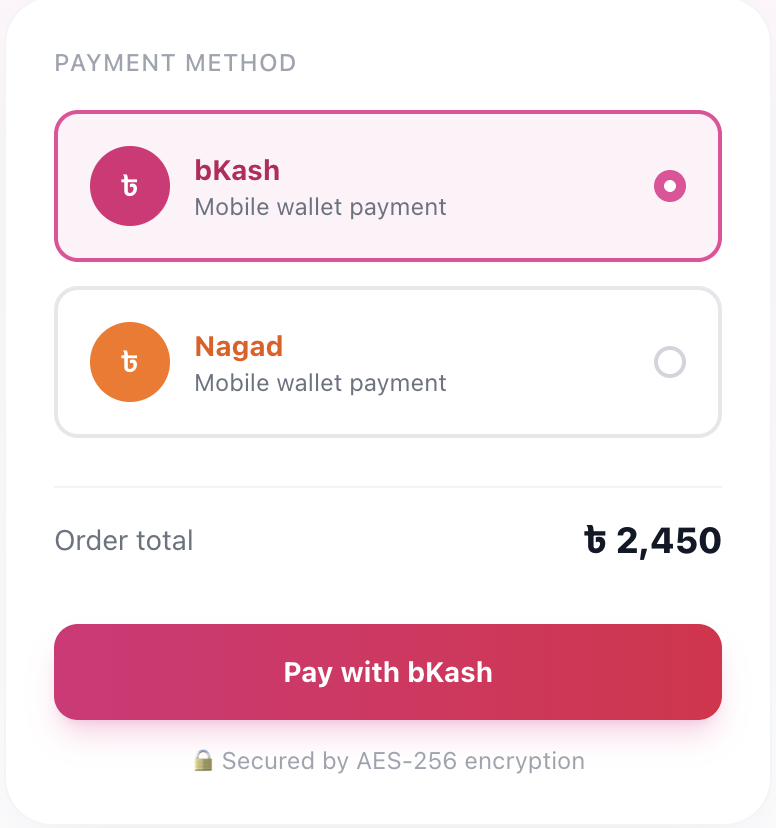
A BD Wallet payment link opens directly on the customer's phone - bKash and Nagad both available at checkout
COD Collection Bangladesh - Without the Phone Calls
COD makes up 60–70% of orders for most Bangladeshi stores. The problem is not getting the order - it is collecting the money after delivery.
BD Wallet turns every COD order into a digital payment opportunity. When a COD order lands, BD Wallet sends the customer a bKash or Nagad payment link automatically.
You choose when the link goes out:
| Trigger Mode | When BD Wallet Sends the Link |
|---|---|
| On Order | Right when the order is placed |
| On Fulfillment | After you ship the product |
| Manual | You click Send from your dashboard |
No more calling customers. No more unpaid orders sitting in limbo.
COD Fraud Protection - Bangladesh's First Shared Fraud Registry
One fraudulent customer can burn merchants across the country. BD Wallet built the first shared Fraud Registry in Bangladesh so every merchant on the platform protects every other merchant.
Before processing a COD order, BD Wallet pulls the customer's delivery history from BDCourier and assigns a risk level automatically:
- 🟢 Low Risk - Safe to fulfill
- 🟡 Medium Risk - Worth a review before shipping
- 🔴 High Risk - History of returns and cancellations
You see this badge on every COD order before you spend money fulfilling it.
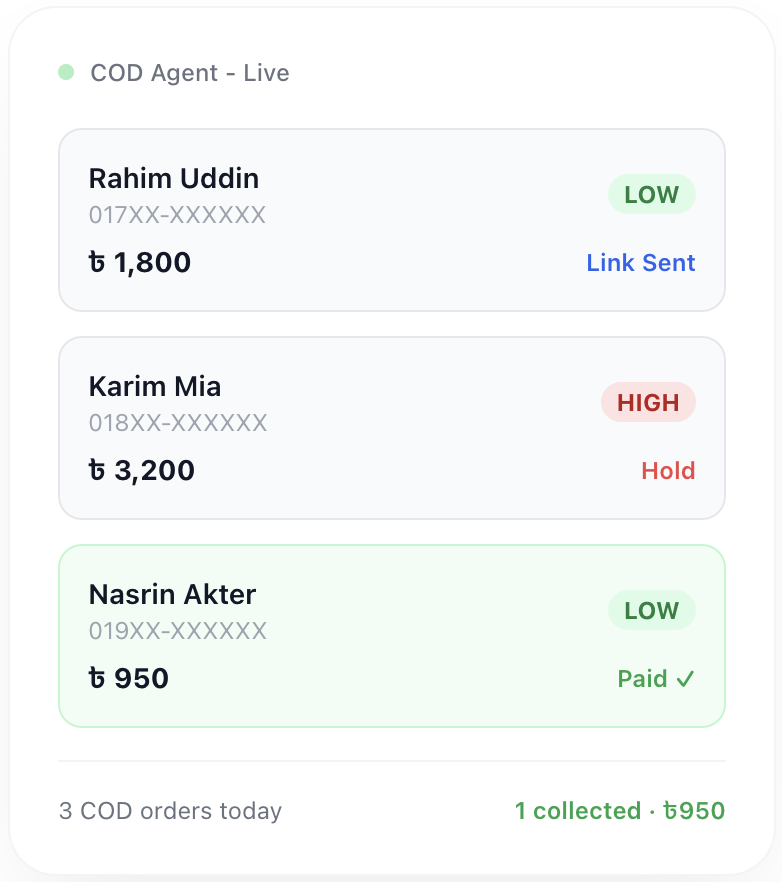
Risk badges appear on every COD order so you can make smarter decisions before shipping
Full Transaction Dashboard
Every Shopify bKash payment and Shopify Nagad payment goes into one clean dashboard inside your Shopify admin. Search by customer name, phone number, or Shopify order ID. Filter by gateway, status, or date.
No spreadsheets. No switching between apps.
Refunds in One Click
Need to refund a customer? Select the transaction, enter the amount, click Refund. BD Wallet sends the money back to their bKash or Nagad wallet directly.
No logging into separate portals. No manual transfers.
Payment Analytics
See which gateway your customers use most, your busiest payment hours, and your revenue trends over time. BD Wallet tracks everything inside your dashboard so you always know where your business stands.
How to Set Up BD Wallet on Your Shopify Store
Step 1 - Install BD Wallet from Shopify Admin
Open Shopify Admin → Apps → Search BD Wallet → Install.
The app connects to your store in seconds.
Step 2 - Add Your bKash Credentials
Go to Settings → bKash inside BD Wallet.
Enter your bKash Tokenized Checkout credentials:
- App Key
- App Secret
- Username
- Password
Click Save. BD Wallet encrypts everything using AES-256 encryption before storing it. Your credentials never sit in plain text.
Step 3 - Add Your Nagad Credentials
Same process. Go to Settings → Nagad, enter your Merchant ID and credentials, click Save.
Step 4 - Enable Each Gateway
Toggle bKash and Nagad to Active. BD Wallet registers them as payment methods in your Shopify store automatically.
Step 5 - Set Up COD Automation
Go to Orders → COD Settings. Pick your trigger mode. From this moment, every COD order gets a payment link sent to the customer automatically.
Total setup time: under 10 minutes.
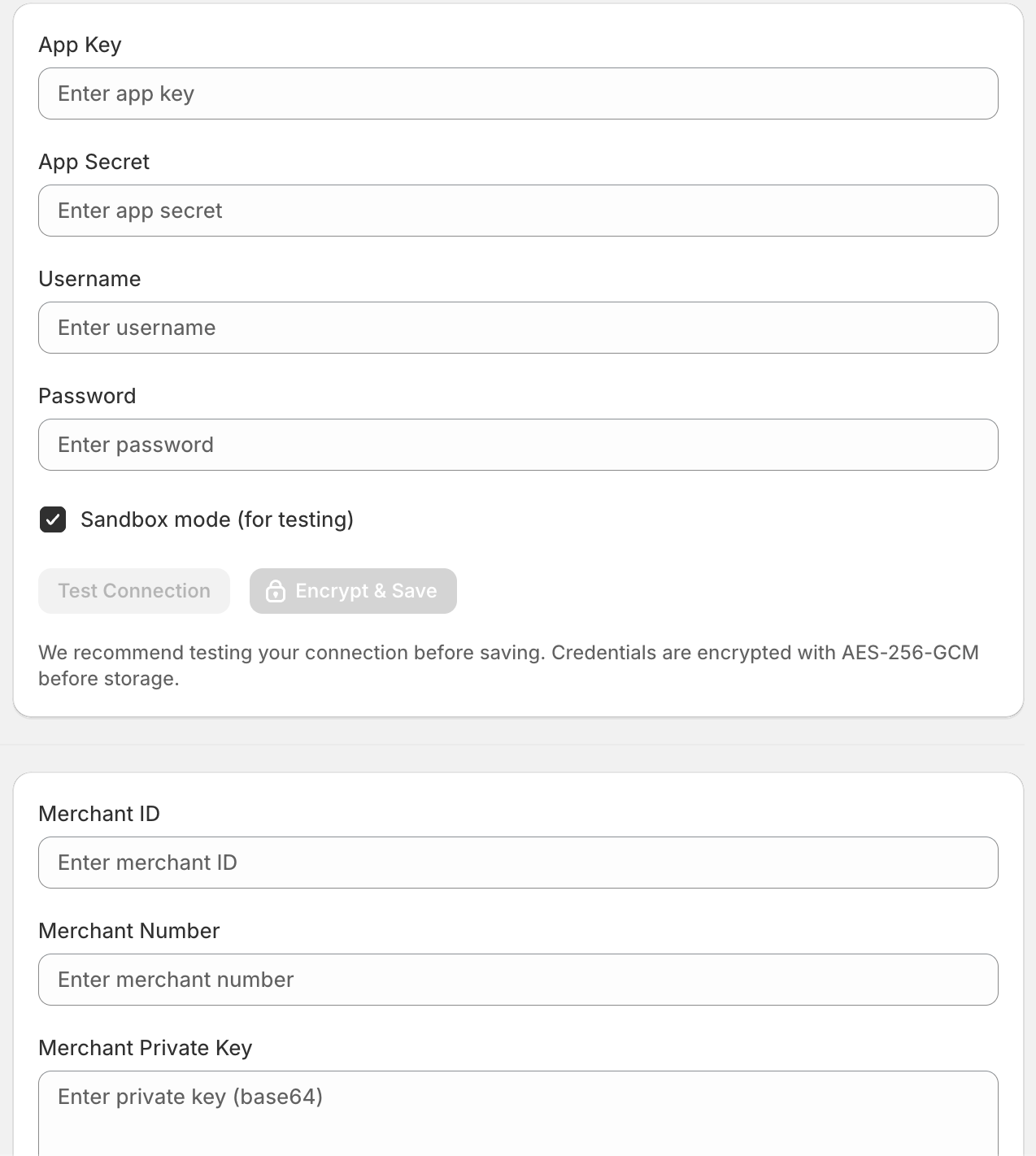
The BD Wallet setup screen - enter your credentials, enable the gateways, done
BD Wallet Pricing - Start Free
| Plan | Monthly Cost | Transactions |
|---|---|---|
| Starter | Free | 10 per month |
| Growth | ৳1,499 | 500 per month |
| Business | ৳2,499 | Unlimited |
| Pay As You Go | 1% of monthly volume | Unlimited |
Start on the free plan. No credit card needed. Upgrade when your store grows.
BD Wallet vs the Manual WhatsApp Method
| Manual WhatsApp Process | BD Wallet | |
|---|---|---|
| Payment link sent automatically | ❌ | ✅ |
| Shopify order confirmed automatically | ❌ | ✅ |
| COD payment collection | ❌ Manual calls | ✅ Automated |
| Fraud risk check before shipping | ❌ | ✅ |
| Refunds from dashboard | ❌ | ✅ |
| Transaction analytics | ❌ | ✅ |
| Works with both bKash and Nagad | ❌ | ✅ |
Frequently Asked Questions
Can I use bKash on Shopify?
Yes. BD Wallet connects your Shopify store to bKash's Tokenized Checkout. Customers get a payment link after ordering and pay through their bKash app on mobile.
Does Shopify support Nagad?
Not natively. BD Wallet adds Nagad as a working payment option by generating a secure Nagad payment link for every order automatically.
How do I collect COD payments digitally in Bangladesh?
BD Wallet's COD automation sends a bKash or Nagad payment link to your COD customers - right after the order, after shipping, or manually from your dashboard.
Is BD Wallet safe for storing my bKash API credentials?
Yes. BD Wallet encrypts all gateway credentials using AES-256-GCM before storing them. Your API keys are never stored in plain text anywhere.
Can I issue refunds through BD Wallet?
Yes. BD Wallet lets you initiate refunds directly from your transaction dashboard. The refund goes back to the customer's bKash or Nagad wallet automatically.
What is the BD Wallet Fraud Registry?
The Fraud Registry is a shared database across all BD Wallet merchants. Every COD order gets a risk check via BDCourier delivery history, showing you a Low, Medium, or High risk badge before you ship.
Start Accepting bKash and Nagad on Shopify Today
You do not need a developer. You do not need to change your Shopify plan. You need BD Wallet.
In 10 minutes your store goes from "please send bKash to this number" to a fully automated payment system that sends links, confirms orders, collects COD payments, and blocks fraud - all without you doing anything manually.
Your competitors are still taking WhatsApp screenshots. You do not have to be.
Install BD Wallet free on Shopify and accept your first bKash or Nagad payment today.
Tagged:
Ready to accept bKash and Nagad on your Shopify store?
Free plan available. No developer needed. Set up in 10 minutes.
Get Started Free